We are contacting you regarding a vulnerability identified during a recent penetration test on our environment.
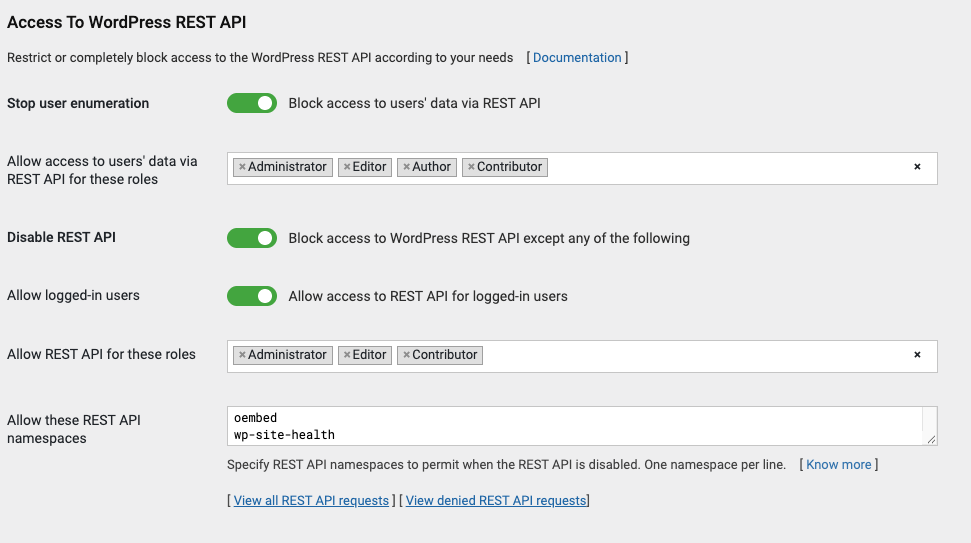
Our application runs on a Roots Bedrock architecture (where WordPress core files reside in the /wp/ subdirectory). We have already enabled and configured the “Stop User Enumeration” setting in the WP Cerber back-office.
While WP Cerber successfully blocks direct REST requests to the standard route (/wp-json/wp/v2/users), the endpoint remains accessible when requested via the query parameter rewrite format through the core path: /wp/wp-json/?rest_route=/wp/v2/users.
We need assistance in ensuring that WP Cerber consistently blocks or restricts user enumeration across all route formats, including Bedrock subfolder query rewrites.
Technical Summary & Observed Behavior
Configured Setting: “Stop user enumeration” is ENABLED in WP Cerber settings.
Blocked Path:GET /wp-json/wp/v2/users → Blocked (403/Forbidden) as expected.
Bypassed Path:GET /wp/wp-json/?rest_route=/wp/v2/users → Not blocked (Returns user array).
Questions & Assistance Requested
Is WP Cerber’s “Stop User Enumeration” module expected to handle ?rest_route= query parameter lookups when WordPress is installed in a subdirectory like Roots Bedrock?
Is there a specific configuration in WP Cerber or an action hook/filter we can use to enforce REST API rules on ?rest_route= query requests?
What is the recommended way to prevent this query parameter rewrite bypass without breaking core WordPress REST functionality?
With “Block access to users’ data via REST API” enabled, WP Cerber handles both URL formats the same way for the same visitor. We tested the same layout (WordPress core in /wp/, as in Bedrock, behind nginx) with the current version of WP Cerber, and both requests return 403 for an anonymous visitor:
GET /wp-json/wp/v2/users                  -> 403
GET /wp/wp-json/?rest_route=/wp/v2/users  -> 403
This means the two requests in the penetration test were made under different conditions. The usual reasons are:
The request came from an IP address in the Allowed IP Access List. These addresses are exempt from WP Cerber’s access restrictions, including this one. Note that WP Cerber automatically adds the IP address of the administrator who activates the plugin, with the comment “My IP address” followed by a date.
The request was sent from a browser logged in as an administrator, or as a user with a role selected in “Allow access to users’ data via REST API for these roles”. These users are allowed through, and WordPress then returns the public user list, which looks exactly like what an anonymous visitor would get.
The response came from a cache or from another environment, for example a staging site with different settings.
To find out which one applies, could you please run this test:
In WP Cerber > Traffic Inspector > Settings, set Logging mode to All traffic for the duration of the test.
From a computer whose IP address is not listed in WP Cerber > Access Lists (a mobile hotspot works well), run these two commands, replacing example.com with your domain. They send no cookies, and the nocache parameter avoids cached responses:
Let us know what each command returned: the WP Cerber page “We’re sorry, you are not allowed to proceed” (status 403), or a list of users (status 200). Please don’t post the user list itself.
Afterwards, you can set the logging mode back to its previous value.
If both requests return 403, the setting works as intended and we need to look at the conditions of the penetration test instead. In that case, please send us the raw HTTP request for the bypassed URL from the pentest report (keep the cookie names but remove their values), and the IP address the pentest was run from, and check whether that address is in the Allowed IP Access List.