I have used WP Cerber for years and appreciated it keeping my little site safe. Last week I decided to use Cloudflare for extra protection. I added the WP Cerber Cloudflare add-on and everything appeared to work fine for about 1 day. Then I noticed that the Reverse Proxy flag got turned off. I turned it back on (yes, I hit [save changes]) but within a day it was off again.
I looked in the WP Cerber Diagnostics Log and I see messages of IP blocks being send to Cloudflare successfully, but I also see the following error message: [BG TASK] ERROR: Function cerber_upgrade_deferred is not callable or not defined
Looking through the log I see this error back as far as back as Feb, 2026, but it never caused a problem, so I never noticed it. However, when I look at the WP Cerber Activity Log and pull up the IP information of visitors the IP Owner is showing correctly when I set the Reverse Proxy flag, but any visitors after the above error shows in the Diagnostic Log show Cloudflarenet as the IP Owner. (Correlation doesn’t mean causation, but this has been the case since I setup Cloudflare.)
Has anyone had experience with the Reverse Proxy flag being reset or how to resolve the above error so I can rule it out as the cause?
We’ve identified a possible cause in WP Cerber’s settings handling. Under certain circumstances, the reverse proxy setting can be disabled when plugin settings are updated without valid proxy headers.
Could you please confirm which version of WP Cerber you are using and whether the plugin was updated or reactivated around the time the reverse proxy setting was disabled?
Also, did the setting turn off without any changes being made to WP Cerber’s settings, or did you save any other settings before noticing it?
The BG TASK error you mentioned appears to be a separate issue.
I am running on version 9.9.5 and I do not see a version number for the Cloudflare add-on.
I had been running 9.9.5 within a few days of it’s release. The Cloudflare add-on is the recent add, but I made some Main Setting changes for it (i.e changing to Standard Mode, and turning on the Reverse Proxy flag). When I first setup it up, it was working fine. Then a couple of days later I could not login as the 2FA was blocking me, despite my IPs being on the Allowed IP list. I had to rename the \wp-content\plugins\wp-cerber directory so that I could login. I renamed the directory back and started researching the cause. I noticed the email with the 2FA code had a Cloudflare IP, not my IP. This had me look at the Main Settings and noticed the Reverse Proxy flag was off. I turned the Reverse Proxy flag back on, and Saved Settings. I started to review the IPs that WP Cerber had blocked overnight and I noticed around the same time as the error message in the log, all the inbound IPs had become Cloudflare IPs, not the real origin IPs. Hence, that is making me think something happened overnight to turn the Reverse Proxy flag off. That would explain why 2FA could not log me in as it was getting conflicting IP addresses for myself.
I have gone ahead and deactivated/deleted WP Cerber and then got a fresh download and reinstall/active (importing my previous configuration). I have manual run the Site Integrity Full Scan (it stopped a few times due to errors but finally completed), and I am monitoring if the Reverse Proxy flag turns off again.
Summary of timeline:
Weeks ago - update to 9.9.5
Last week (Thursday?) - created Cloudflare account, installed WP Cerber Cloudflare Add-on
Friday morning - login and everything appears to be operating fine
Friday late day - cannot login as 2FA fails. Rename WP Cerber directory to login, then reset directory name. Reset the Reverse Proxy flag.
Saturday morning - cannot login as 2FA fails. Rename WP Cerber directory to login, then reset directory name. Reset the Reverse Proxy flag. During research I see that WP Cerber correctly blocked originator IPs Friday night but around 1:30am it started blocking Cloudflare IPs. When I looked in the Activity log I can see all the IP address starting to belong to Cloudflare around that time. I went in the Diagnostic Log and other than messages about sending IPs to Cloudflare was the error message that was right between the time the originator IPs switched to being Cloudflare IPs.
Saturday mid-day, created this General Support thread.
Saturday afternoon, export WP Cerber Config; deactivate WP Cerber, download WP Cerber, install, activate, import config. Ran a Site Integrity Quick Scan - it has a few errors but always has. Ran a Site Integrity Full Scan, it stopped a number of times (I think my computer going to sleep mode) but eventually finished Sunday morning.
Sunday, it has been running fine all day, I have not seen the [BG TASK] error (the reinstall may have cleared that issue) but will continue to monitor.
Thank you for the detailed timeline. That helps a lot.
We’ve confirmed an issue in WP Cerber 9.9.5 that can cause the reverse proxy setting to be disabled when plugin settings are processed without valid proxy headers. We’re addressing this in the plugin.
One detail caught my attention: you’re hosting WordPress on a Synology NAS.
When accessing your WordPress admin dashboard, do you always use the public hostname through Cloudflare, or do you sometimes access the NAS directly over your local network?
I’m asking because accessing WordPress locally can bypass Cloudflare, resulting in missing proxy headers. This could explain the setting being disabled during certain configuration operations.
It’s encouraging that everything has been working normally since the reinstall. Please let us know if the issue occurs again.
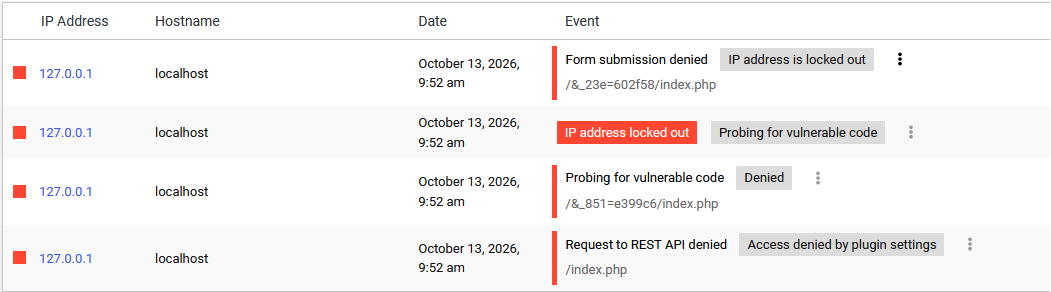
Not sure if this is related to the Reverse Proxy flag flipping and it’s the first time I have seen IP 127.0.0.1 in the log, but it obvious would not be going through Cloudflare. Is WP Cerber doing self tests? This was around the time this morning that I upgraded from 9.9.5 to 9.10 so I am not sure which version was in when this happened.